Manage Google Ads Campaigns with Google Ads for Webflow
Build and monitor Performance Max campaigns in Webflow, from choosing goals and creative to reviewing results.
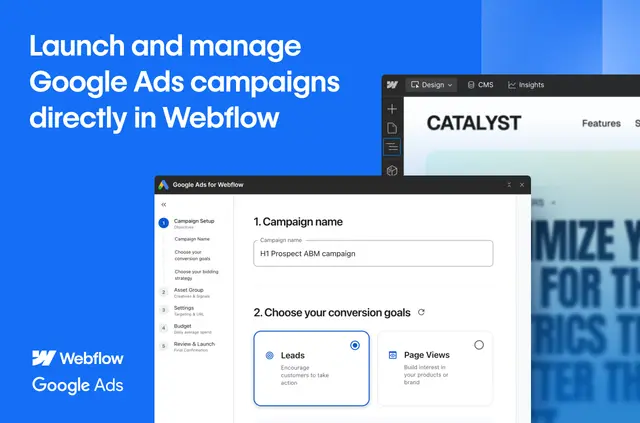
Without Google Ads for Webflow, builders may need extra tools and manual steps to set up ads, select creative and follow campaign results. The app brings Performance Max campaign work into Webflow.
It links one or more Webflow sites with Google Ads. Teams can connect an account they already use or create one during setup.
Where it fits
This app is suited to Webflow users who want to create and manage Google Ads campaigns without moving between tools. It can serve projects with one site or several, while the dashboard gathers campaign measures and controls in one place.
Features worth knowing
- A guided setup covers campaign goals, budget, bidding, targeting, URLs and creative materials.
- Choose images and logos from Webflow assets, or upload images while configuring a campaign.
- Before publishing, review a campaign preview and checks of campaign details and policies.
- The dashboard reports clicks, impressions, conversions and cost; campaign controls include pausing, enabling and updating, alongside asset group health and policy summaries.
- Tracking support can set up a Google Tag and conversion event snippets. A beta feature uses Google Ads Gen AI and site content to produce headlines, descriptions and images.
How setup works
Install the app, then link one or more Webflow sites to a Google Ads account, either an existing one or a newly created one. Requested Webflow access includes editing pages, custom code, assets, forms and sites, plus reading the user profile.
Follow the guided wizard to configure campaign settings and creative assets. Check the preview and policy review before publishing. The app is paid.
Common questions
What campaign performance can I see in the dashboard?
The dashboard tracks clicks, impressions, conversions and cost for Performance Max campaigns.
Can I use Google Analytics events for lead generation?
Yes. The app can optionally collect Google Analytics events for lead generation.
Can I add images during campaign setup?
Yes. You can upload new images during setup, as well as choose visuals from your Webflow assets.
Can I check campaign policy information?
Yes. Before publishing, the app checks campaign details and policies and provides a preview. You can also review policy summaries afterward.
Can the app create campaign text and images?
A beta feature can generate headlines, descriptions and images using Google Ads Gen AI together with site content.