Track Form Conversions Across Ad Platforms with Converly Webflow App
Send form-submission conversions from your Webflow site to advertising and analytics platforms.
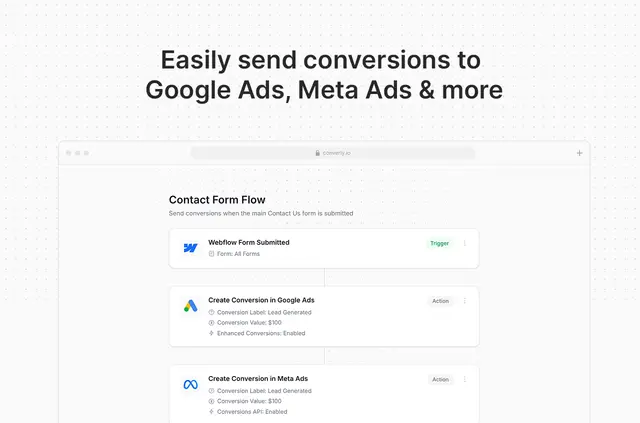
Without Converly, you may have to handle extra setup or tools to pass website leads to advertising and analytics services. After installing the app, use its drag-and-drop builder to choose a form-submission trigger and the conversion actions to run.
Conversion events go directly to platform servers, rather than depending only on browser tracking. Converly is intended for agencies and businesses that collect website leads and run advertising campaigns.
Before you install
The Webflow app is free to install and links to a Converly account with a free trial. The offering includes a free option and paid plans.
The requested Webflow permissions let Converly change custom code and view sites and your user profile.
Feature notes
- Configure a form-submission trigger and conversion actions in the drag-and-drop builder.
- Use Webflow native forms or connect other form, scheduling, and chat tools, including Typeform, HubSpot Forms, Calendly, Cal.com, and Intercom.
- Check the debug log for captured details, destination platforms, and delivery status.
Questions about Converly
Can agencies use Converly on client sites?
Yes. Converly is intended for agencies and businesses that generate website leads and run advertising campaigns.
Can I send conversions to Google Analytics 4?
Yes. Destinations span Google Analytics 4 and advertising services from Google, Meta, Microsoft, and LinkedIn.
What information can conversion data contain?
It may carry browser details and submitted fields, for example a visitor’s name, email address, or phone number.
How do I set up a conversion action?
Install the Webflow app, then use the visual builder to select a form-submission trigger and the actions to perform.
Can Converly work with tools beyond Webflow forms?
Yes. It supports other form, scheduling, and chat tools, such as Typeform, HubSpot Forms, Calendly, Cal.com, and Intercom.