Publish Documents to the CMS with BlogSync Webflow App
BlogSync works with Webflow CMS, turning Google Docs and Word files into content for a CMS collection.
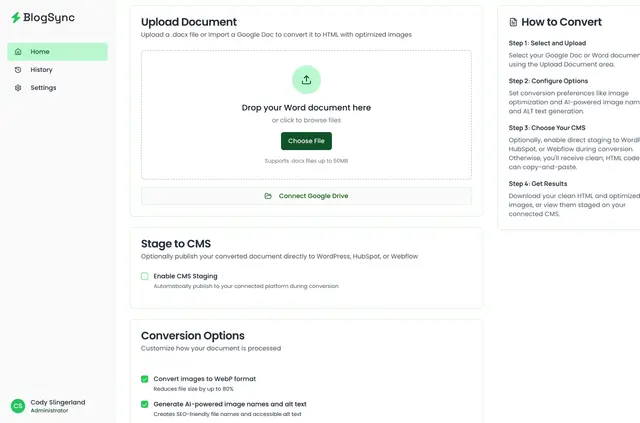
Without BlogSync, teams drafting in Google Docs or Word have to move content into Webflow CMS and handle formatting and images during the process. BlogSync converts those documents into HTML and publishes the content to a CMS collection.
Made by Cody's Workspace, BlogSync is for teams that write in either document tool before publishing in Webflow. It offers a free option and paid plans.
Features worth knowing
- Preserves headings, paragraphs, lists, tables, quotes, and inline images when converting documents.
- Compresses images, converts them to WebP, and creates SEO-friendly filenames.
- Adds AI-generated alt text to images and uploads them to Webflow Assets.
- Supports publishing to shared Webflow sites with role-based team permissions.
What it handles
In a Webflow project, BlogSync turns document content into HTML for a chosen CMS collection. Teams can inspect the converted content before it is published, including elements such as tables and quotes.
How setup works
Connect a Webflow site to BlogSync once. For later use, choose a Google Docs or Word document, review the conversion, then publish it to Webflow CMS.
Quick answers about BlogSync
Do I need a paid Webflow plan for BlogSync?
A Webflow CMS plan is required.
What Webflow access does BlogSync request?
BlogSync can edit CMS content and assets, and read site details and your user profile.
Can content be checked before publishing?
Yes. Teams can review converted content before publishing it to Webflow CMS.
How does BlogSync handle document images?
It compresses images, converts them to WebP, generates SEO-friendly filenames and AI-written alt text, then uploads them to Webflow Assets.
Can team members publish to a shared Webflow site?
Yes. Team members can publish to shared sites using role-based permissions.