Track Traffic and Engagement with Analyzely for GA4 Webflow App
Connect a Webflow site to GA4 and view its analytics reports in Webflow with Analyzely for GA4.
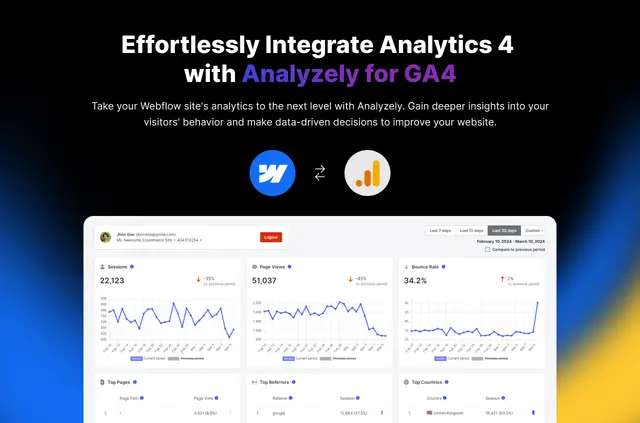
Freelancers, agencies, small business owners, marketing teams, and people new to analytics can use Analyzely for GA4 to see Google Analytics 4 reports in Webflow. The app installs and manages tracking code automatically, so there is no need to add code by hand.
To connect a site, authorize a Google account, select a GA4 property, and link that property to the Webflow site. Multiple sites can be connected, each paired with its own property.
Getting started in Webflow
Install the app, authorize a Google account, choose a GA4 property, and connect it to a Webflow site. Analyzely then handles the GA4 tracking code for that site.
Open the dashboard to review page views, users, traffic sources, engagement, visitor location, and device details.
Worth checking first
The Free Plan is for one Webflow site and provides a basic dashboard, automatic code injection, and core reports. Pro allows unlimited sites and includes advanced reports, real-time data, traffic analysis, geographic insights, device and browser breakdowns, and priority support.
The app is listed with a free option and paid plans. Each connected Webflow site uses its own GA4 property.
Questions about Analyzely for GA4
Can I use Analyzely for GA4 on an Ecommerce site?
The app can read ecommerce data in Webflow. Its dashboard also presents analytics about site activity, traffic sources, engagement, location, and devices.
Is Analyzely for GA4 free?
Yes. A free option is available for one Webflow site; paid plans are also listed.
What can Analyzely for GA4 access in my Webflow account?
It can edit custom code and sites. It can also read ecommerce data, the site activity log, and your user profile.
Can I connect more than one Webflow site?
Yes. Analyzely supports multiple sites, with a distinct GA4 property for each. Pro supports unlimited Webflow sites.
Does Analyzely for GA4 show live analytics?
Real-time data is included with the Pro Plan. The dashboard is where reports are displayed in Webflow.