Customize Shadows & Gradients with Smart Shadows Webflow App
In Webflow, Smart Shadows builds box and text shadows, glow effects, and gradients for site elements.
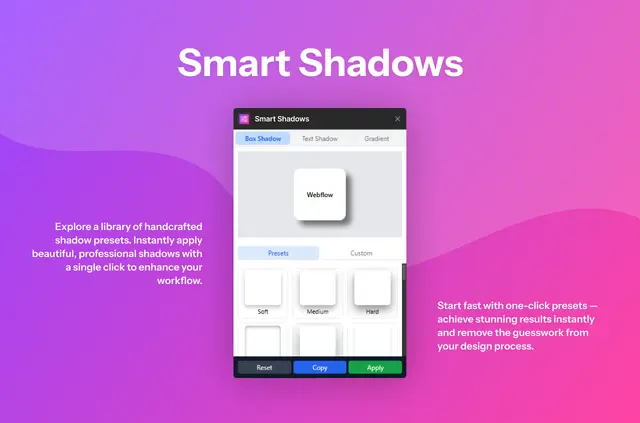
Webflow pages can use custom shadows, glow effects, and gradients, configured in the app rather than through code. Site owners can begin with presets or adjust the settings themselves.
Fluttertop Studio made Smart Shadows, which is listed as free.
What Smart Shadows does
The app creates visual effects for Webflow projects. Box shadow controls include inset or outset styling, X and Y offsets, blur, spread, opacity, and color; text shadows have controls for offsets, blur, opacity, and color.
For gradients, users can set the angle, add multiple colors, and position color stops. Finished styles can be used on Webflow elements or copied as CSS.
Features worth knowing
- Configure box shadows with inset or outset styles, offsets, blur, spread, opacity, and color.
- Set text shadow offsets, blur, opacity, and color.
- Adjust gradient angles, add colors, and position each color stop.
- Use presets for shadows, text effects, and gradients, or reset settings to start again.
Who it suits
Smart Shadows suits Webflow users who want to shape shadows and gradients without writing code. It fits projects that call for tailored effects on page elements, whether people start from a preset or set the controls themselves.
Smart Shadows FAQ
Can I start with a preset?
Yes. Presets are available for box shadows, text effects, and gradients.
Can I copy CSS for a style I create?
Yes. Smart Shadows lets users copy the CSS for a created style.
How can I use a finished style in my project?
Users can apply a created style to an element in Webflow or copy its CSS.
What does reset do?
Reset clears the current settings so users can begin a new design.
Which effects can I create?
Smart Shadows creates box shadows, text shadows, glow effects, and gradients within Webflow.