Automate Schema Markup & AI SEO with SchemaRabbit Webflow App
SchemaRabbit works in your Webflow project to audit technical SEO and manage schema markup and LLMs.txt.

This is a technical SEO and AI search app for Webflow. Connect a site to begin automated implementation, monitoring, and upkeep of schema markup and LLMs.txt, without writing code.
FlowRabbits made SchemaRabbit for teams working on e-commerce, publishing, local businesses, growing brands, and agency projects.
What you can do with it
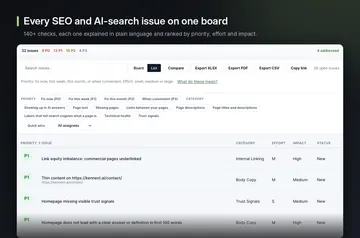
In a Webflow project, SchemaRabbit can add and maintain structured information for products, articles, FAQs, local business details, and events. It also checks a site for schema errors, issues that affect AI readability, and other technical SEO gaps.
Use keyword analysis to find potential topics for conventional search and AI discovery. Competitive analysis highlights how other sites differ in schema, AI optimization, and search visibility, giving you areas to review in your own project.
The main tools
The app combines site checks with automated updates and research tools, so you can review technical issues alongside opportunities to improve how your site is understood in search.
- Audit a Webflow site for schema errors, AI readability concerns, and technical SEO gaps.
- Implement, monitor, and maintain schema markup and LLMs.txt after connecting your site.
- Explore keyword opportunities for traditional search and AI discovery.
- Compare competitors’ schema, AI optimization, and search visibility.
Quick answers about SchemaRabbit
Can I use SchemaRabbit without coding?
Yes. Connect your Webflow site to start automated implementation, monitoring, and maintenance without coding.
Which types of projects can use SchemaRabbit?
It is suited to e-commerce sites, publishers, local businesses, growing brands, and agencies.
Where is SchemaRabbit intended to improve visibility?
It targets visibility in Google and AI search tools, including ChatGPT, Perplexity, and Claude.
Which parts of a Webflow site can SchemaRabbit edit?
When installed, it requests permission to edit pages, custom code, and sites.