Sync Airtable Records to CMS with CMS Bridge Webflow App
Manage Webflow CMS collections from Airtable by connecting a base, mapping fields, and controlling item updates.
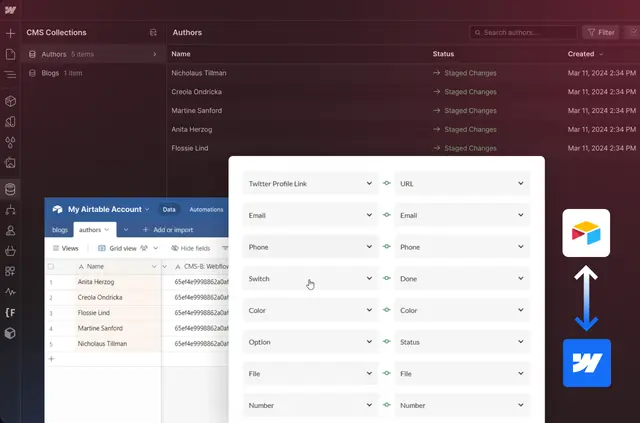
When CMS Bridge is set up, Airtable records can determine the content and status of their matching Webflow CMS items. Link an Airtable base with a Webflow website, then map columns to collection fields.
Use Airtable to create, edit, remove, or publish CMS entries. A record can also govern whether its paired item syncs and whether it is a draft, archived, staged, or published.
Who it suits
CMS Bridge is suited to teams that handle Webflow CMS content in Airtable, including projects built around Airtable Synced Tables. Airtable formulas, conditional rules, and automations can form part of the process for managing Webflow content.
How setup works
Install the app, connect a Webflow site and Airtable base, and match Airtable columns with Webflow CMS fields. Once connected, use Airtable records to manage the corresponding collection items.
Database syncing happens in the background, allowing you to close the app window while processing continues.
Pricing and permissions
CMS Bridge is listed as free. Its requested Webflow permissions are the ability to edit CMS content and read sites.
Questions about CMS Bridge
Who is the developer behind CMS Bridge?
CMS Bridge is made by Finsweet.
Which statuses can an Airtable record assign to a CMS item?
It can set the corresponding Webflow item to draft, archive, stage, or publish.
Can I use Airtable logic in a Webflow content workflow?
Yes. Airtable formulas, conditional logic, and automations can support workflows for Webflow content.
Does syncing stop if I close the app window?
No. Database syncs process in the background, so the window can be closed.
Does CMS Bridge support syncing in both directions?
Yes. It provides two-way syncing between Airtable data and Webflow CMS collections.