Import Wireframes for Web Design with Claritee Webflow App
Plan and refine Webflow wireframes, then bring them into the design workflow with their structure intact.
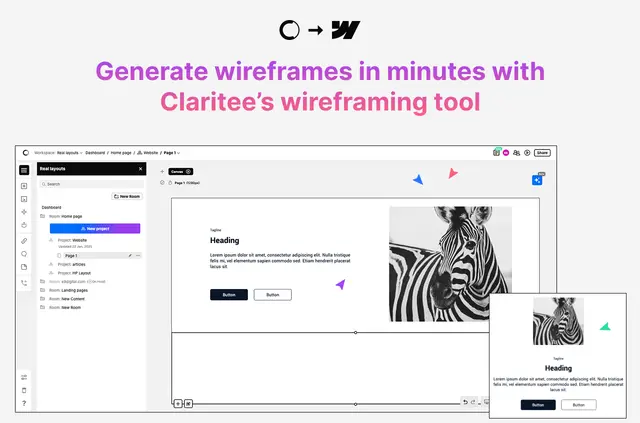
Claritee connects with Webflow to support planning before high-fidelity design. It helps project teams shape page layouts and review wireframes before bringing them into Webflow.
Web designers, developers, UX and UI groups, agencies, and other teams can use it to organize project ideas and discuss changes together.
Getting started in Webflow
Getting started requires a Claritee account, installing the app in Webflow, and connecting a project. After those steps, users can import wireframes into the connected project.
What it handles
The tool helps teams arrange page layouts, components, and content, then refine wireframes through feedback. Existing Claritee wireframes can be uploaded to Webflow without changing their structure.
Feature notes
- Use drag and drop to position layouts, components, and content.
- Share wireframes so teammates can comment and make changes in real time.
- Organize wireframes with sections, grids, and templates for review and iteration.
Questions about Claritee
Can a team comment on wireframes together?
Yes. Teams can share wireframes, comment, and make changes in real time.
Can existing Claritee wireframes be moved into Webflow?
Yes. Users can upload existing Claritee wireframes to Webflow while preserving their structure.
How can wireframes be arranged for review?
Sections, grids, and templates help organize wireframes for review and iteration.
What can be arranged with drag and drop?
The interface supports arranging layouts, components, and content.
When does Claritee fit into the Webflow design process?
Claritee supports planning and feedback before teams move wireframes into high-fidelity design in Webflow.