Research Keywords and Publish SEO Content with Blazly SEO Webflow App
Blazly SEO connects to Webflow through OAuth to send content drafts to CMS collections for your review before publishing.

You connect a Webflow site to Blazly SEO through OAuth. It sends content to CMS collections as drafts, leaving you to review and publish each item.
Research, planning, writing and content checks share one workspace. You can connect Google Search Console to use search performance data in audits.
Who it suits
Blazly SEO is designed for marketers, founders and agencies that publish through Webflow. It brings together tasks for planning and preparing site articles, from choosing topics to reviewing drafts.
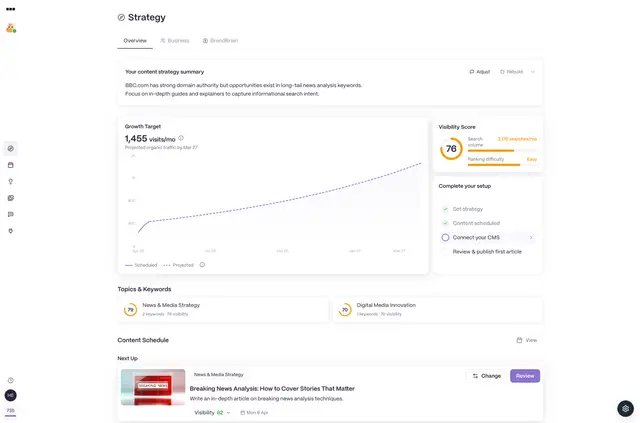
Keyword research covers difficulty, intent, volume, related ideas and geographic breakdowns where available. Enter a seed keyword in the strategy builder to create pillar and cluster article ideas with a publishing schedule.
Access and pricing
The app has a free option and paid plans. Selected exploration and content tools are included on the Free plan, while Webflow CMS integrations require a paid plan. Creating articles in batches from a CSV is a Pro feature.
When installed, Blazly SEO requests permission to edit your Webflow CMS and sites. A Webflow site connects through OAuth; Google Search Console is another available connection.
Blazly SEO FAQ
What inputs can I give the AI writer?
Provide a title, keywords and tone for a long-form draft. You can also include competitor URLs.
Which review tools are available for content?
Blazly SEO includes text humanization, plagiarism checks, on-page analysis, SEO audits and page-speed diagnostics.
What Search Console metrics can inform audits?
The Google Search Console connection provides clicks, impressions, average position and CTR data for audits.
Can I plan a group of related articles from one keyword?
Yes. The strategy builder turns a seed keyword into pillar and cluster article ideas and pairs them with a publishing schedule.
How does batch article generation work?
The Pro Bulk Generator uses a CSV of titles and keywords to produce articles in batches.