Arrange Text Along Curved Paths with Arc Text Webflow App
Make curved or circular SVG lettering in Webflow for badges, logos, headlines, calls to action, and labels.
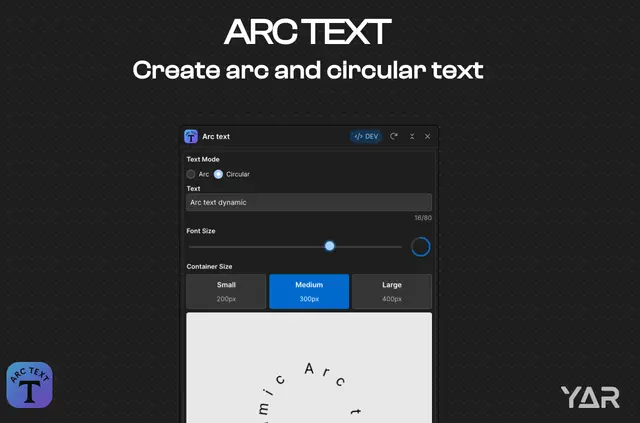
Curved lettering takes shape in the Webflow Designer, where site builders can preview text arranged along an arc or full circle. Arc Text inserts the completed design into a selected container element.
Made by Yar Roshidi and listed as free, the app creates SVG artwork for page elements that call for text on a curve. The inserted design can go straight into a site that is ready to publish.
Worth checking first
A container element must be selected before insertion. Arc Text stops the process if the selection is invalid or the design settings do not pass validation.
The text is inserted as an SVG without external scripts. The app also respects reduced-motion and high-contrast preferences, which matter for visitors with those settings enabled.
Where it fits
Arc Text suits projects that use curved type for badges, seals, logos, calls to action, hero headlines, or decorative labels. It provides a way to add those treatments to a chosen element in a Webflow design.
The resulting SVG is responsive and resolution-independent, so it can adapt to different display sizes while retaining the same vector artwork. An optional rotation setting supports animated badge and seal designs.
How setup works
Open Arc Text in Webflow Designer, select a container element, and enter the text to shape. Choose a position along the top, right, bottom, or left of the arc, then set the font size and select a small, medium, or large container preset.
Use the live preview to review the design as its text and settings change, then insert the SVG into the selected element. The app saves the most recent configuration automatically.
Arc Text FAQ
Does Arc Text offer a full-circle text layout?
Yes. Text can be arranged along an arc or around a complete circle.
Can I adjust the font size and container dimensions?
Yes. Arc Text has font-size controls and small, medium, and large container presets.
Does Arc Text remember my previous settings?
It saves the last configuration automatically.
Does the app support motion and contrast preferences?
Arc Text respects reduced-motion and high-contrast preferences.
Is any extra setup needed after inserting the SVG?
No. Once the SVG is inserted, the site can be published without additional setup.