Protect Forms from Spam with TrustCaptcha Webflow App
TrustCaptcha adds bot and spam protection to Webflow forms, where you configure and place its CAPTCHA widget.
TrustCaptcha is a CAPTCHA app for protecting Webflow forms from bots and spam. It evaluates traffic with Proof-of-Work and behavioral risk scoring, so visitors do not have to solve puzzles.
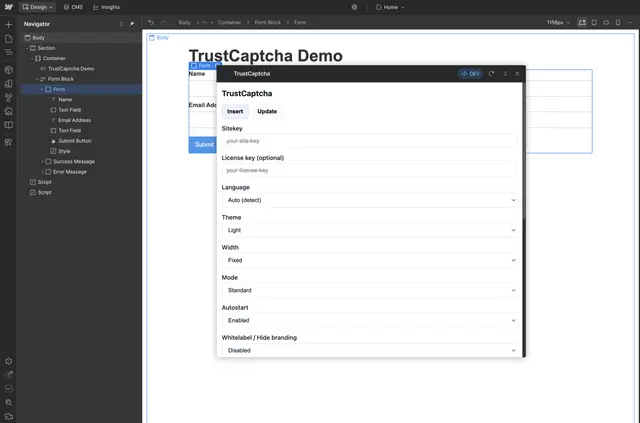
You configure the widget in Webflow Designer, then add it to a form. A configurable risk threshold lets you set the level of protection for different forms or use cases.
Limits to know
You need a valid Sitekey to use TrustCaptcha; a testing bypass token is not a substitute. The app supports Webflow Forms and other backends, with server-side token verification required for backend use.
The widget’s branding can be hidden with a licensed white-label option. An optional Privacy URL can send visitors to your privacy policy.
What TrustCaptcha does
In Designer, choose the widget’s language, theme and display mode, then insert it into a selected form. TrustCaptcha adds the required script and a Designer placeholder, and can update widget instances already in your project.
You can use invisible mode, optional visitor hints, light or dark themes, and fixed or full-width layouts. Language detection and support for more than 30 languages help configure display, while custom translations and JSON-based design overrides allow further changes.
Quick answers about TrustCaptcha
How much does TrustCaptcha cost?
TrustCaptcha is listed as free.
Where do I use TrustCaptcha once it's installed?
Add its widget to a selected Webflow form in Designer. It also works with other backends through server-side token verification.
How do you install TrustCaptcha in Webflow?
Open the app in Webflow Designer, enter a valid Sitekey, select a language, theme and mode, then insert the widget into a form. The app adds its required script and Designer placeholder.
Can I change the protection level for different forms?
Yes. Set a configurable risk threshold to suit different forms or use cases.
Can I customize the widget’s appearance and language?
Yes. Choose light or dark styling and fixed or full-width layout, and use custom translations or JSON-based design overrides. The widget also supports language detection and more than 30 languages.