Optimize CMS Content for SEO with SynqPro Webflow App
Help articles and CMS pages rank better with on-page SEO scores, recommendations and editing tools in Webflow.
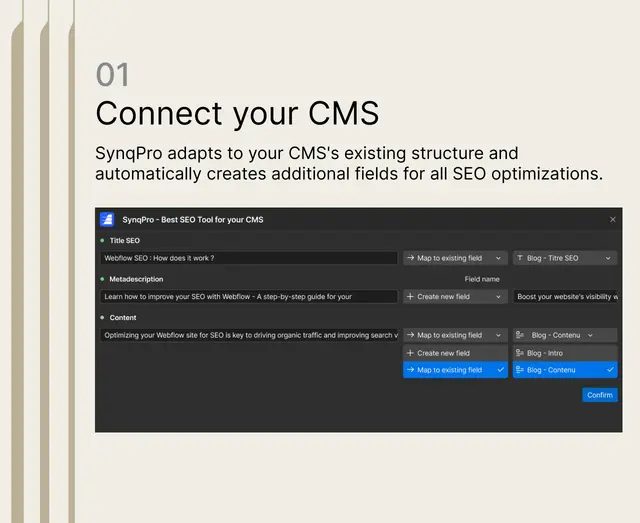
Webflow users who manage articles and CMS pages can assess on-page SEO as they work in Designer. SynqPro scores CMS content and recommends changes, with tools for page titles, search descriptions, headings, keywords, image ALT text and internal links.
It identifies the active CMS collection and creates fields required for SEO tasks. Optimized CMS entries can then be published to the site in one click.
Pricing and permissions
Basic is free and covers unlimited sites and CMS items, content editing, manual SEO tools, scoring and recommendations. Premium is 29 EUR per month, includes a 14-day free trial, AI features and priority support.
SynqPro can edit CMS content and read sites and the user profile.
How setup works
Get SynqPro from the Webflow Apps Marketplace, approve CMS and publishing access, then launch it in Webflow Designer. It detects the collection and adds fields needed for SEO work.
Premium tools include generating articles with AI, editing help, GEO optimization, keyword enrichment and automated linking. Synqro made the app.
SynqPro FAQ
Which on-page SEO elements can I work on?
SynqPro offers editing controls for titles, meta descriptions, headings, keywords, ALT tags and internal links on Webflow articles and CMS pages.
Where does SynqPro run?
It runs within Webflow Designer and scores CMS content during the editing process.
How do optimized changes reach my site?
Users can publish optimized CMS entries to their Webflow site with a single click.
What does Premium add?
Premium adds AI article creation, editing assistance, GEO optimization, keyword enrichment, automated links and priority support.