Create Clickable Rich Text TOCs with Rich Text TOC Webflow App
Give visitors a clickable guide to sections in Webflow content, built from headings in Rich Text blocks.
Webflow publishers use Rich Text TOC to help people navigate long blog posts, documentation, landing pages, and CMS articles. It builds a clickable contents guide from headings in a Rich Text block, so visitors can jump to the corresponding section.
The app supports H1 through H4 headings and provides Classic, Boxed, and Minimal appearance options. Its static-page and CMS-template workflows differ, particularly in how the generated contents are handled.
Getting started in Webflow
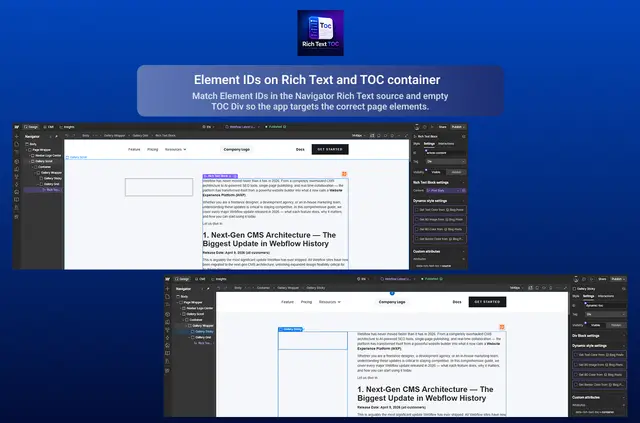
To begin, install the app and open the site in Designer. Give the Rich Text block an Element ID, then add an empty Div where the contents guide should appear.
For a static page, the app makes editable list and link elements in Designer, with no script added. On a CMS template, set the TOC Div to Apply to site and publish; a hosted footer script named Rich Text TOC reads the headings and builds the contents.
Access and pricing
The app is free, with no ads, subscriptions, or tracking. It requests permission to edit custom code and to read sites and the user profile.
Caveats
Only actual H1–H4 heading tags qualify as entries; bold styling by itself is not enough. CMS templates rely on the hosted footer script, unlike static pages.
Uninstalling ends access to the app, but a footer script published for a CMS template may require separate removal.
Quick answers about Rich Text TOC
Can visitors use the contents links to move around a page?
Yes. Each link takes visitors to its corresponding section.
Which visual presets can be used?
The available presets are Classic, Boxed, and Minimal.
Who created Rich Text TOC?
It was made by Khushal Tank.
Does the app include ads or a subscription?
No. Rich Text TOC is free and has no ads or subscriptions.
Does uninstalling remove the published CMS script?
Uninstalling ends app access. A CMS footer script that has already been published may need to be removed separately.