Send AI Content to CMS Drafts with Omnibound Webflow App
Omnibound sends AI-created marketing content to a selected Webflow CMS collection as drafts.
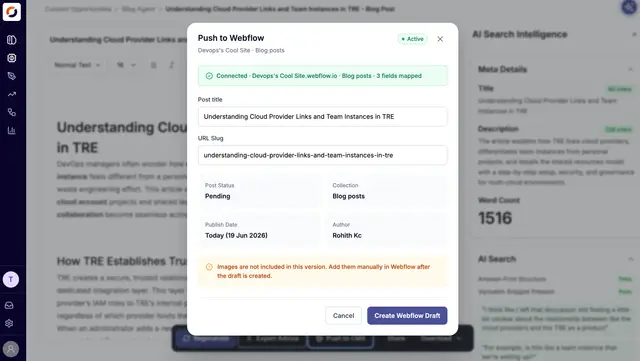
Omnibound is a content-transfer app that sends AI-generated marketing material from its platform to Webflow CMS. Content arrives in a chosen collection as a draft for review, rather than going live automatically.
Marketing teams, content teams and agencies can use it when they create material in Omnibound and manage their publishing workflow in Webflow CMS.
Worth checking first
The integration needs permission to edit CMS content and read site information. A Webflow account must be connected through OAuth, and the user selects a site and collection in Omnibound.
Transferred content remains a draft; the integration does not publish it live automatically. Required Webflow fields that Omnibound does not populate need default values.
Where it fits
Omnibound is suited to teams and agencies producing marketing content in its platform and maintaining that content in Webflow CMS. Sending material to a selected collection gives those teams a draft to review in their CMS workflow.
The connection reads the chosen collection’s schema, allowing content fields to be matched with Webflow fields. It supports mapping the title, slug and body, with defaults available for other required fields.
Setting it up
Connect a Webflow account with OAuth, then choose the site and CMS collection in Omnibound. After the collection schema is read, map the content fields to the corresponding Webflow fields and set defaults for required fields the content does not supply.
Run a test push to check the connection. This creates a temporary draft item and removes it after the check. For later transfers, the integration generates slugs, resolves slug collisions, cleans HTML and validates required fields. Status and error messages show when the Webflow connection needs to be restored.
Questions about Omnibound
Does Omnibound publish content straight to my live Webflow site?
No. Content is sent to the chosen CMS collection as a draft for review, not published live automatically.
Which Webflow permissions does the connection request?
It requests permission to edit CMS content and read sites.
Can I choose which Webflow collection receives content?
Yes. After connecting an account through OAuth, select a site and collection in Omnibound.
What happens during a test push?
Omnibound creates a temporary draft item to check the connection, then removes that test item.
How does Omnibound handle Webflow fields and slugs?
Users can map title, slug and body fields, and provide defaults for required fields that Omnibound does not fill. The integration generates slugs, handles collisions, cleans HTML and checks required fields.