Convert and Review Images with Image Management Webflow App
For Webflow teams reviewing large image collections, Image Management converts selected images to WebP or AVIF.
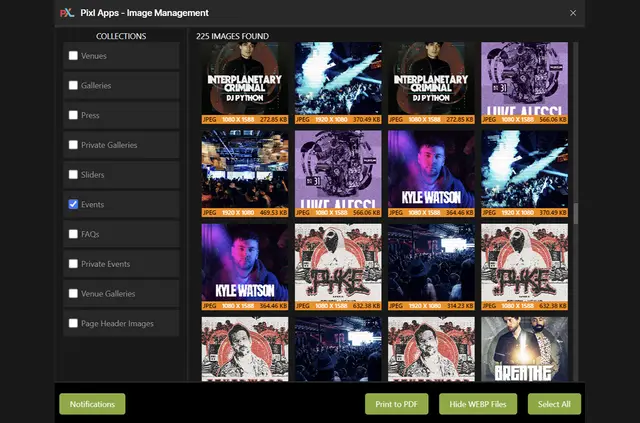
If you manage a large set of Webflow images, you can use Image Management to review collection images and convert selected files without leaving Webflow. Pixl Events made the app.
Adjust quality and resolution, then follow conversion progress or errors through in-app and email alerts.
Features worth knowing
- Convert images from Webflow collections to WebP or AVIF, choosing the files you want to process.
- Adjust compression quality and image resolution to suit your needs.
- Use color labels and full-screen previews to review collection images.
- Export or back up existing images, or create PDF contact sheets.
- Get in-app and email alerts about conversion progress and errors.
What it asks for
The app is listed with a free option and paid plans. It requests permission to edit CMS content and read your sites and user profile.
What you can do with it
Use it within Webflow to select images from one or more collections and convert only those you choose. For example, review a collection with previews and labels, then adjust compression settings before converting selected images.
You can also make a backup or export of existing images, and create a PDF contact sheet for reviewing a collection.
Common questions
Does Image Management work with Webflow CMS collections?
Yes. It converts images in Webflow collections, and you can select images from multiple collections.
Can I convert just some images in a collection?
Yes. Choose the images you want to convert; you do not have to process every image.
Which image formats can I convert to?
You can convert collection images to WebP or AVIF.
Can I adjust image quality and resolution?
Yes. Compression controls let you set image quality and resolution.
Can I save a record of a collection for review?
You can create a PDF contact sheet, export images, or back up existing images.