Generate SEO Pages from Keywords with FlowScribe Webflow App
Get AI-written SEO pages for a Webflow site, shaped by long-tail keywords and a brief about its niche and writing style.
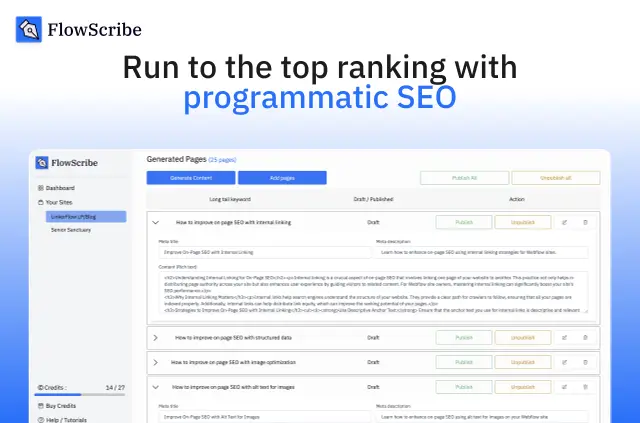
Long-tail keywords become AI-written SEO pages that can be published to Webflow CMS. A niche and writing-style brief guides the generated content.
Made by Agence No Code Workspace, FlowScribe charges for generated pages on a pay-as-you-go basis, with no long-term subscription. It has a free option and paid plans.
Setting it up
Install FlowScribe and connect it to Webflow. The app can edit CMS, pages and sites, and read the site activity log and user profile.
Provide a main keyword and a brief covering the niche and writing style. Add other keywords manually or import them from a CSV file.
When it's a good fit
Content creators, agencies and business owners can use FlowScribe to produce SEO pages for Webflow sites. It suits projects built around long-tail search terms, where a brief can guide the generated content.
FlowScribe in practice
FlowScribe can generate niche-focused long-tail keywords and organize related terms into clusters, or work from keywords supplied by the user.
It creates pages with AI-written content in over 100 languages and connects to Webflow CMS for publishing. The no-code workflow is designed to avoid manual page adjustments.
Quick answers about FlowScribe
Can FlowScribe suggest keywords as well as use supplied ones?
Yes. It can generate long-tail keywords for a niche and cluster related terms. Users can also enter keywords themselves or import a CSV.
Can I guide the writing style of generated pages?
Yes. A brief about the niche and writing style guides page generation.
How many languages can generated pages use?
Generated pages can be created in over 100 languages.
Does FlowScribe require manual page adjustments?
Its no-code workflow is designed so pages do not need manual adjustments.