Manage SEO Metadata Across Pages with Curio SEO Manager Webflow App
Edit SEO fields across Webflow pages, review character limits, and manage changes in one place.
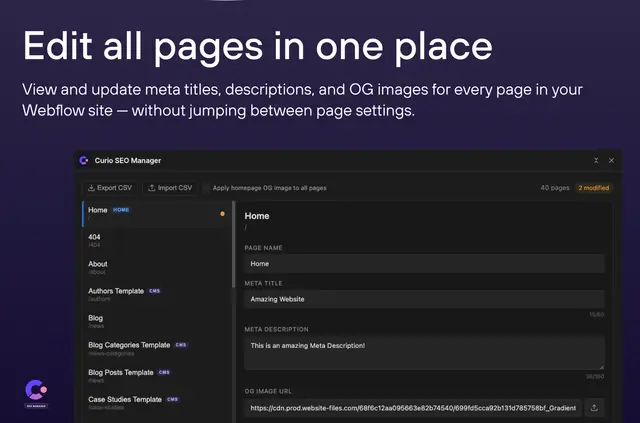
Webflow site teams use Curio SEO Manager to work on page names, meta titles, descriptions, and Open Graph images within the Designer. It is made by Curio Digital and listed as free.
Character counters mark the 60-character title and 160-character description limits. Changes to several pages can be saved together, while CSV tools support spreadsheet-based editing.
Feature notes
- Edit page names, meta titles, meta descriptions, and Open Graph images.
- Use counters to track title length against 60 characters and description length against 160.
- Apply the homepage Open Graph image across the site with a checkbox.
- Make changes on multiple pages and save them together.
- Import and export SEO data as CSV, and identify CMS-bound fields with read-only badges.
What Curio SEO Manager does
The app works inside Webflow Designer and does not require a login or external APIs. For example, a team can update titles and descriptions on several pages, then save those edits together.
For spreadsheet workflows, export SEO data to CSV, edit it, and bring the changes back into the app. Read-only badges identify fields connected to the CMS, and a checkbox can use the homepage Open Graph image across the site.
Questions about Curio SEO Manager
Can I edit SEO details on several pages at once?
Yes. You can change details across multiple pages and save the edits together.
Can I work on SEO data in a spreadsheet?
Yes. CSV import and export let you edit the data in a spreadsheet and bring changes back into the app.
Does the app need a separate login or external API?
No. It runs in Webflow Designer and requires neither a login nor external APIs.
How can I tell which fields are connected to the CMS?
CMS-bound fields have read-only badges.
Can I use the homepage Open Graph image across my site?
Yes. A checkbox applies the homepage Open Graph image across the site.