Track 404s and Stage Redirects with 404 Guardian Webflow App
See missing-page visits, prioritize broken URLs, and prepare redirects for Webflow’s 301 manager.
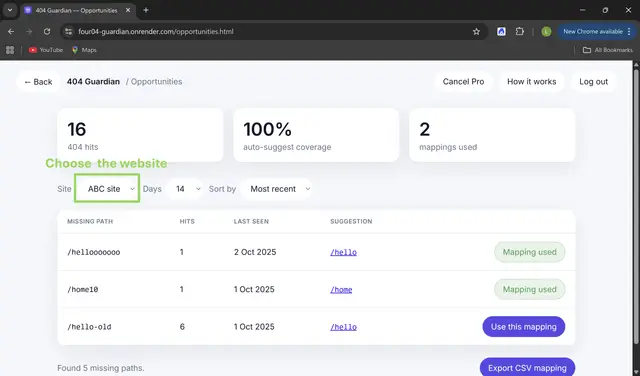
Marketing, SEO, e-commerce, agency, product, and support teams can use 404 Guardian to find broken links and plan repairs across Webflow sites.
The app uses OAuth to connect to Webflow and supports monitoring across multiple workspaces. FeGi Software makes it.
Where it fits
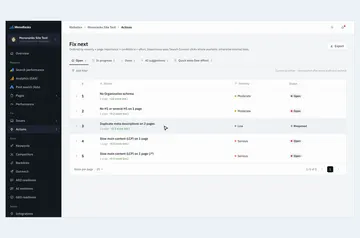
Use it when your team manages broken links across Webflow sites and needs to decide which URLs to address first. Events are grouped by site, time period, and impact.
What you can do with it
404 Guardian logs visits to missing pages and proposes redirect destinations by checking URL paths against your Webflow site structure and content.
Approve and stage mappings, then export a CSV for Webflow’s 301 manager.
Things to keep in mind
Setup involves installing the app, authorizing workspaces, choosing sites, and adding a tracking snippet to each site’s 404 page. Requested access includes editing pages, custom code, and sites, and reading CMS content and your profile.
Automated redirect publishing is on the roadmap; for now, mappings are staged and exported. The app has a free option and paid plans.
404 Guardian FAQ
Can I monitor sites in more than one Webflow workspace?
Yes. 404 Guardian supports monitoring multiple workspaces through its Webflow OAuth connection.
What does 404 Guardian compare when suggesting redirect destinations?
It checks missing URL paths against pages, CMS content, folders, and redirects already in place.
Can I publish redirects directly from 404 Guardian?
Direct automated publishing is a roadmap item. You can stage approved mappings and download a CSV for Webflow’s 301 manager.
What do I need to do to set it up on a site?
Install the app, authorize your Webflow workspace, select the site, and add a tracking snippet to its 404 page.
What Webflow permissions does the app request?
It can edit pages, custom code, and sites, and read CMS content and your user profile.