GSAP Skew Up Animation Webflow cloneable
Elevate your webpage with a GSAP Skew Up Animation Webflow cloneable by Orange Studio. Easy to implement, this effect captivates visitors with staggered text transitions, boosting user engagement and modernizing the site's aesthetics. Utilize this cloneable to enhance visual appeal and user experience effortlessly.
About cloneable
This Webflow cloneable, crafted by Orange Studio, brings a modern animation effect that effortlessly enhances any webpage. It features a sleek GSAP Skew Up Animation, designed to captivate visitors as they scroll. This effect, currently trending across the web, offers a visually engaging experience that elevates a site’s aesthetic appeal.
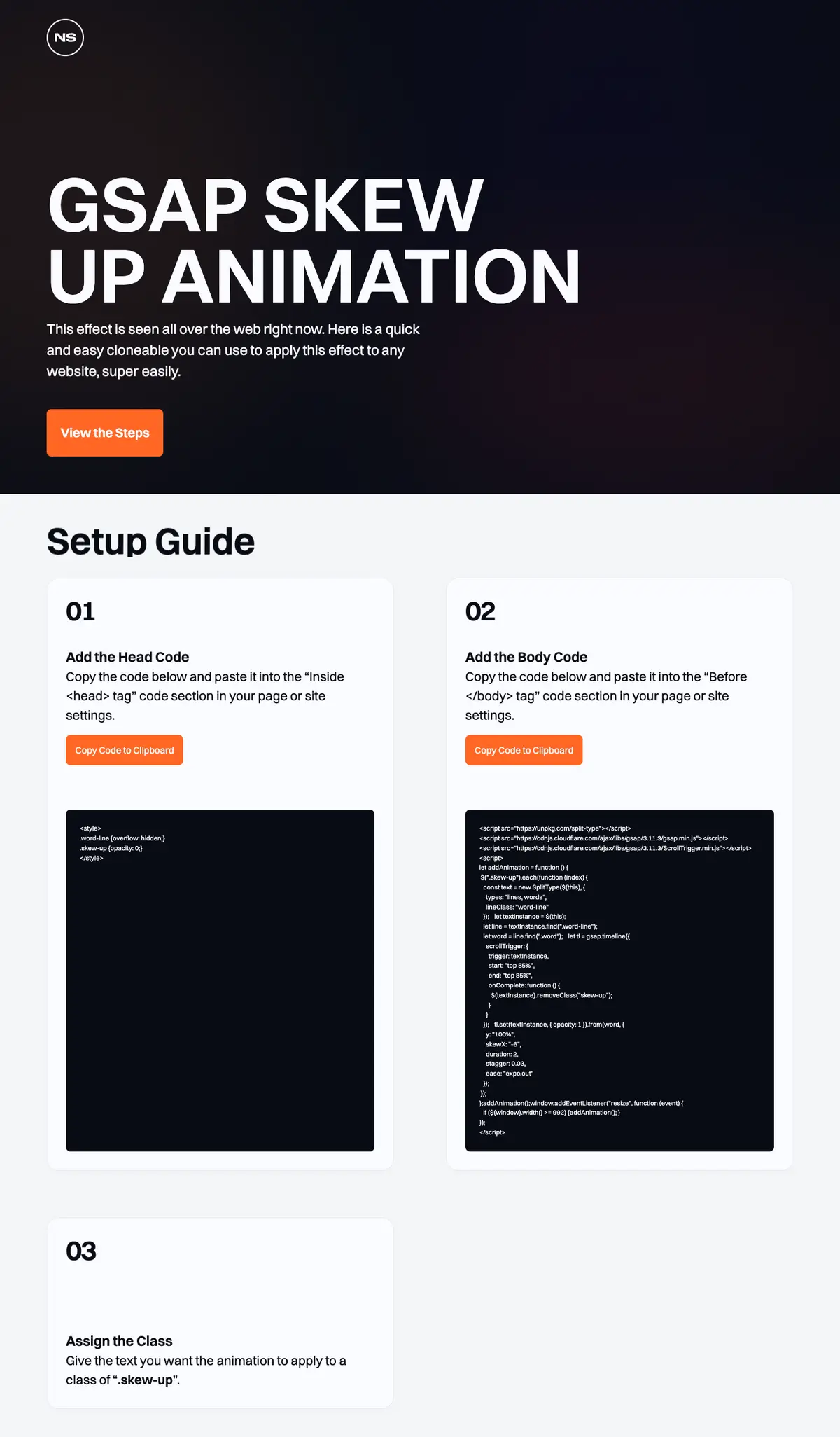
The cloneable is straightforward to implement, requiring minimal setup. Users simply add specific code snippets to their Webflow project, assigning the class “.skew-up” to the desired text elements. Once applied, the animation transforms text by creating a staggered appearance as it shifts into view, adding depth and interest to static content.
Benefits of implementing this cloneable include heightened user engagement, as animations can draw attention to key sections of the website. The surprising transitions can encourage visitors to read further or explore more, effectively increasing time spent on the page. Additionally, the incorporation of responsive design principles ensures that the animations perform well on various devices, maintaining a polished look across mobile and desktop views.
This cloneable employs powerful JavaScript libraries such as GSAP and Split-Type.js, guaranteeing smooth animations that enhance load performance and visual fluidity. By utilizing these industry-standard tools, users can easily create a professional-grade interactive experience that aligns with modern web design trends.
Integrating this dynamic skew up animation into a Webflow project not only modernizes the website’s visual language but also enhances overall user experience, making it a valuable addition for any designer looking to stand out in a digital landscape.
About CSS
How does the .word-line class handle overflow in Webflow?
The .word-line class in the provided CSS uses the overflow: hidden; property. This means that any content that exceeds the boundaries of the element with this class will not be displayed. This can be useful in Webflow when you want to create effects or avoid horizontal scrolling, ensuring that the layout remains clean and tidy.
What effect does .skew-up class have on elements in Webflow?
The .skew-up class sets the element’s opacity to 0. This makes the element completely transparent and invisible to users. In Webflow, this could be utilized for animations or transitions where elements become visible after a specific event or user interaction, allowing for a smoother visual experience.
How does the font-size property work in the body style for responsiveness in Webflow?
The font-size: 1.1111111111111112vw; sets the font size based on the viewport width (vw). This means the font size will adjust as the size of the browser window changes, enhancing responsiveness. In Webflow, this approach helps maintain proportionate text sizes across different devices, making it particularly useful for ensuring text is legible on various screen sizes.
About Javascript
How does the Split-Type.js library work in conjunction with Webflow animations?
Split-Type.js is utilized to split text into individual lines and words, enabling more complex and dynamic animations. In the provided code, it is used inside the addAnimation function, which targets elements with the class .skew-up. By splitting the text, each word can be animated separately, creating a visually engaging effect as the text comes into view when users scroll down the page. This approach enhances the overall aesthetic of a Webflow project by providing detailed text animations.
How does GSAP (GreenSock Animation Platform) and its ScrollTrigger plugin enhance animations in Webflow?
GSAP and its ScrollTrigger plugin are powerful tools for creating performant animated effects. In this code, they facilitate scroll-based animations by triggering tweens when elements come into view. The timeline (tl) uses properties like opacity and y transformation to animate words within each text element. The integration ensures smooth animations that can be perfectly timed with user scrolling on a Webflow site, enhancing user engagement and visual storytelling.
What does the resize event listener do in the Webflow code?
The resize event listener ensures that animations are reapplied whenever the window is resized, particularly for responsive designs. In this Webflow project, if the viewport width is greater than or equal to 992 pixels, it calls addAnimation() again. This dynamic re-triggering of animations allows for a consistent visual experience on different device sizes, thus optimizing the responsiveness of webpage elements created in Webflow.
How is the GSAP timeline used for the clipboard copy acknowledgment?
In this code, a GSAP timeline (copiedTl) is used to create an animation that acknowledges when a copy action is performed. When the button with the class .btn-parent.copy is clicked, the timeline restarts, animating an element with the class .is-copied to fade in and then out, giving visual feedback to the user that the text has been copied. This enhances the user experience by ensuring users are aware of their action, which is essential in interactive web applications built with Webflow.