Split Screen Onboarding Flow Webflow Cloneable
A split-screen onboarding flow with goal selection, workspace setup, profile details, progress indicators, and testimonial panels for membership products.

About cloneable
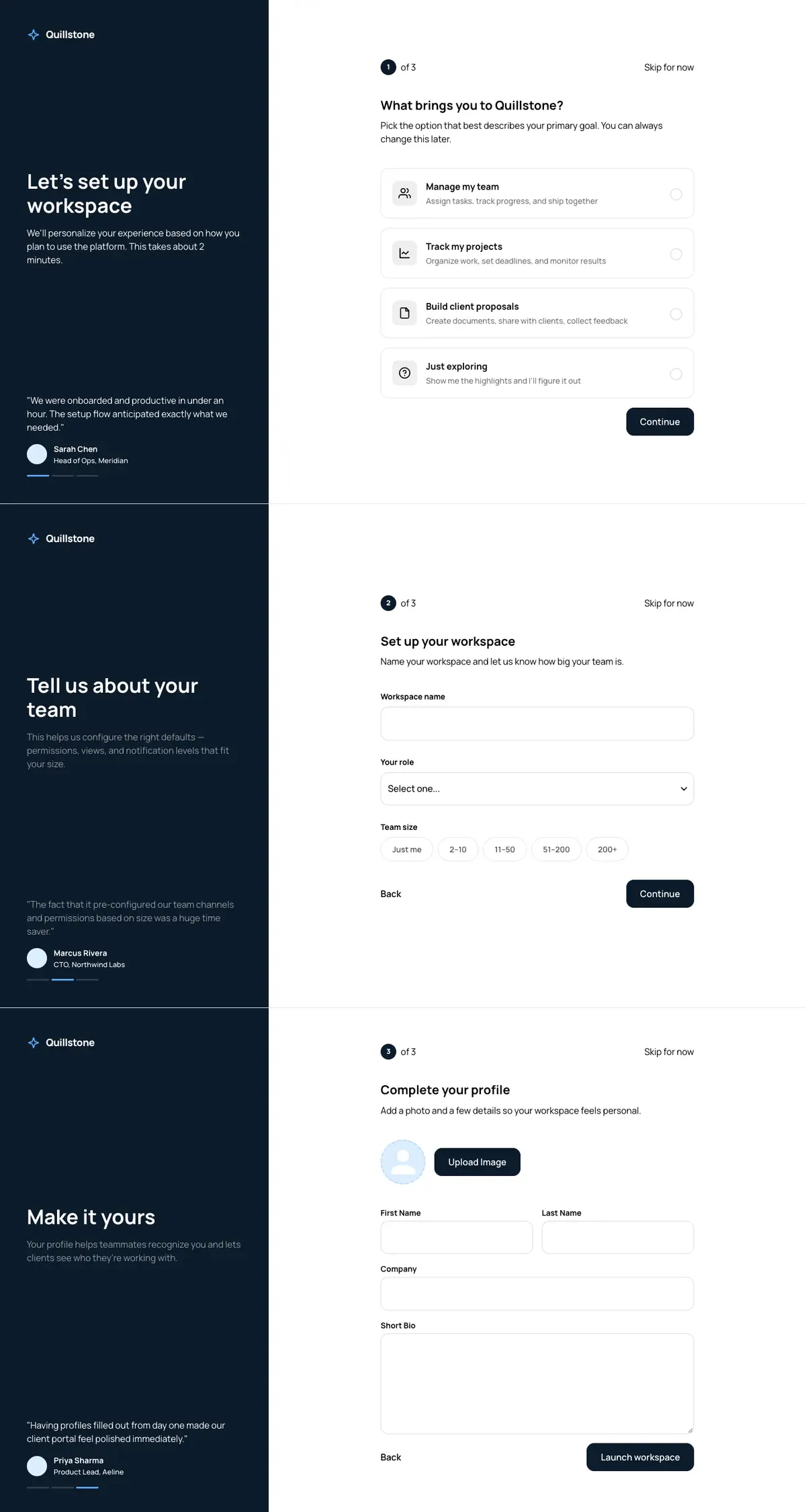
This cloneable is a three-step onboarding flow for a membership product. Each step pairs a dark brand panel on the left with a white form area on the right. The form side includes a goal-selection screen with four options, a workspace setup screen with fields for the workspace name, role, and team size, and a profile-completion step. Numbered progress indicators mark the first and second steps in the visible screens, with a skip link and navigation buttons to move through the flow.
The left panel carries the product identity and step-specific messaging, alongside a testimonial with a customer name, role, and organization. Its testimonial content and progress dots change as visitors advance. Each step is built as a separate Webflow form; submitting a form redirects to the next step through a URL hash. This lets the flow use Webflow’s native form handling while sending custom fields to Memberstack.
A product team could clone this layout to collect setup preferences and account details during membership onboarding. It suits flows that need to gather a primary goal, workspace information, and profile data while keeping brand copy and customer feedback visible beside the forms.